How to use the Email Campaigns Page
Email Campaigns are one-time sends to a Segment; perfect for promotions, announcements, and newsletters. The Email Campaigns page lists all of your draft and past Email Campaigns with engagement metrics and allows you to create and schedule new ones.
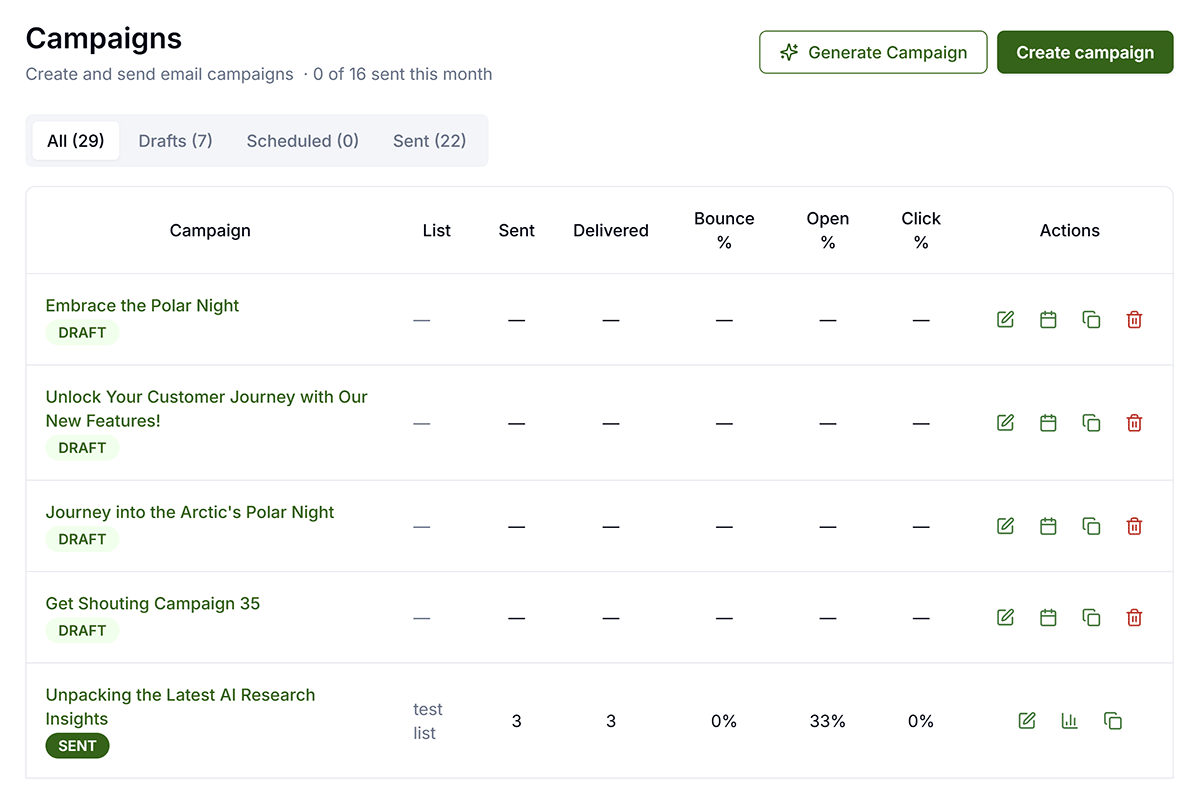
Create & Send
Create Campaign — Campaigns can be created manually, Generate from a URL, or create with a combination of Content Templates and Design Templates. Any email can have a new Design Template applied at any time.
Core Actions

- Edit: Clicking the Edit icon or the name of the Email will open the Email on the Email Editor page.
- Schedule: For drafts — opens Schedule Selector overlay, choose date/time
- Analyze: View metrics (List, Sent, Delivered, Bounce %, Open %, Click %)
- Duplicate: Duplicate Email (same assets, copy, platforms) Creates an exact copy of the Email which you can edit or schedule. All edits or changes will only apply to this unique new Email. Does not copy analytics.
- Delete: Permanently remove. Scheduled = cancels publish. Published = removes from Get Shouting but Email has already been sent.
After the send
- Review opens, clicks, bounces, and complaints in analytics.
- Compare performance to past campaigns and adjust subject lines and segments next time.