How to Use Billing Tab
Manage your subscription (Stripe or Shopify), see usage, referrals, and billing history—based on how your brand pays.
Who can access: Super Admin only.
Regular Admin and User roles do not see Billing.
Plans: Available across all plans where your role allows.
Your Account is billed either through Direct Billing (via Stripe) or through Shopify (Shopify App Store install), not both. The app shows the right screens automatically.
Accessing the Billing Tab
- Click on your Display Name in the top right corner of the navigation bar
- Click the Billing tab
Direct Billing (via Stripe)
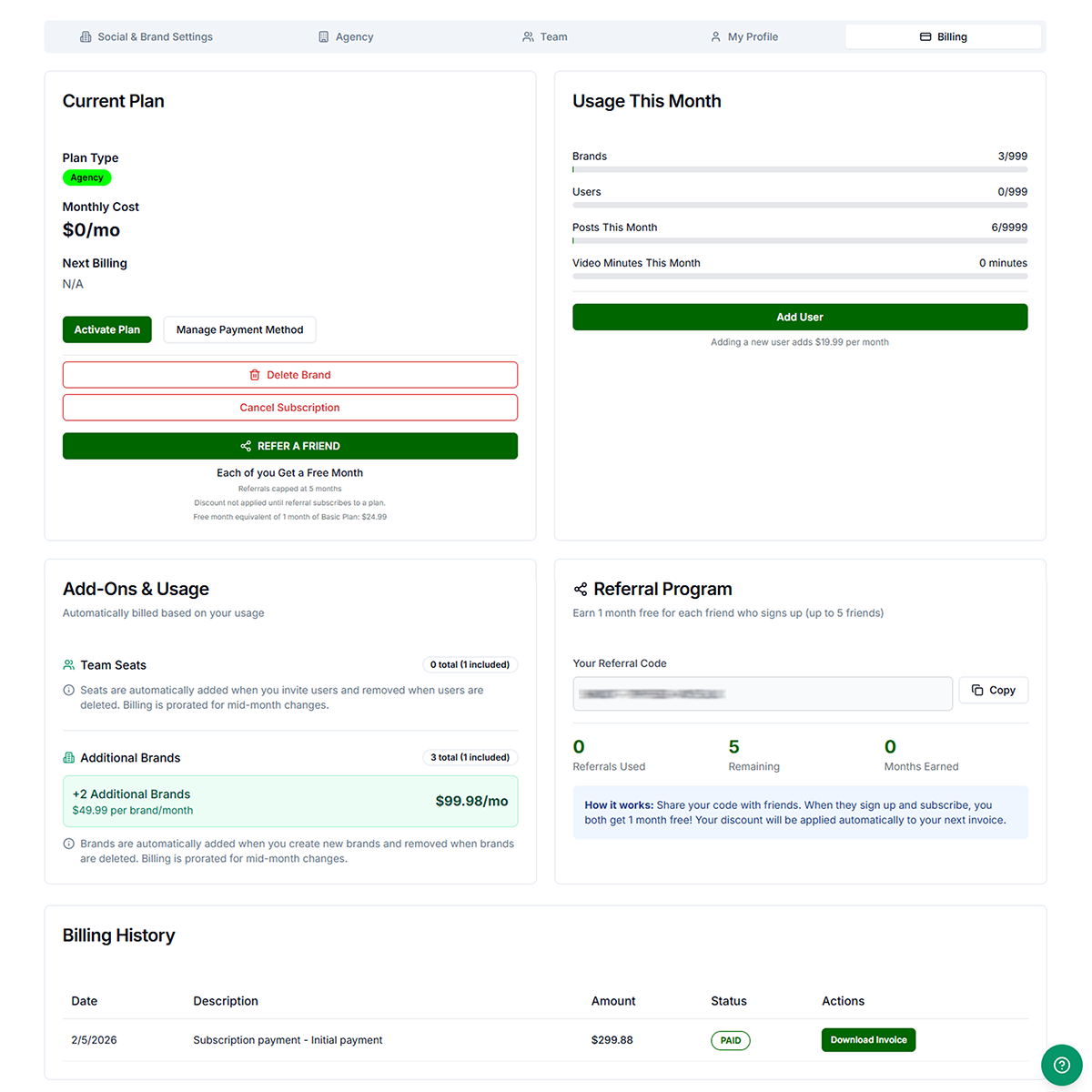
- Plan type & status — Plan name and subscription or trial status
- Monthly cost and next billing (or trial end)
- Activate Plan / Change Plan — Opens plan selection, then Stripe checkout or upgrade as applicable. Timing of upgrades/downgrades follows what you confirm in the flow.
- Manage Payment Method — When shown, opens the Stripe customer portal. Card numbers are not stored on Get Shouting servers.
- Cancel Subscription / Delete Brand — Options depend on your plan and how many brands you have. For Stripe, you may be able to cancel at the end of the billing period (keep access until then) or use a destructive path—read the dialogs carefully.
A Refer A Friend callout may appear on this tab. Referrals are capped at 5. Program details and reward amounts are shown in the product.
Shopify billing (Shopify App Store)
- Status, plan, billing cycle, estimated amount, and next billing where shown
- Manage in Shopify Admin — Opens Shopify so you can work with the app and your store
- Change Plan — You choose a plan in Get Shouting, then approve the charge in Shopify
- Cancel Subscription — Cancels the app subscription per the prompts. The Stripe-only “cancel at end of period” option is not shown for Shopify—follow the on-screen choices
- No “Manage Payment Method” in Get Shouting for Shopify brands—payment is managed in Shopify
If the app was uninstalled in Shopify, messaging may explain that billing stopped there; use Shopify for receipts and payment details.
Usage This Month
- Usage — When available: brands, users, posts this month, and video minutes (within plan limits)
Monitor usage against your plan. For Stripe brands, keep your card current via Manage Payment Method when shown.
Add-Ons & extra purchases
The Billing tab shows usage and plan summaries. A dedicated Add-Ons panel (buy extra video hours, seat/brand add-on summaries on this screen) may not appear in the current app—it is not enabled in the product build users see today.
Inviting users or adding brands may still affect billing through your subscription (Stripe or Shopify) depending on plan and flow. Use Team / Agency / invite flows where applicable, or contact support.
Referral Program
- View your referral code — Copy your unique code to share with friends
- Track referrals — See referrals used, remaining (up to 5), and months earned
Share your code with friends. When they sign up and subscribe, you both get 1 month free. Your discount is applied automatically to your next invoice.
Billing History
- Stripe — Lists transactions when available; Download Invoice when Stripe provides a PDF or hosted invoice link
- Shopify — Subscription charges run in Shopify; this list may be empty or incomplete. Use Shopify Admin for app billing and invoices
Troubleshooting
- Billing tab not visible: Your role may be Admin or User. Billing is for Super Admin, Shouter, or Super Shouter.
- Wrong screens or buttons: Check whether your brand uses Stripe or Shopify billing (different cards and actions).
- Shopify — can’t change plan: Complete approval in Shopify; ensure the store is still connected.
- Shopify — no invoices in the app: Check Shopify Admin for the app’s billing and receipts.
- Payment failed (Stripe): Update payment method; verify billing address; try another card.
- Invoice not downloading: Allow pop-ups for getshouting.app; try another browser; if there is no link on file, contact support.