How to Use Billing Tab
Manage subscriptions, payment methods, view invoices, and handle add-ons.
Required: Super Admin only. Plans: All plans. If you don't see the Billing tab, you must be a Super Admin. Users and Admins must request a Super Admin to handle billing.
Accessing the Billing Tab
- Click on your Display Name in the top right corner of the navigation bar
- Click the Billing tab
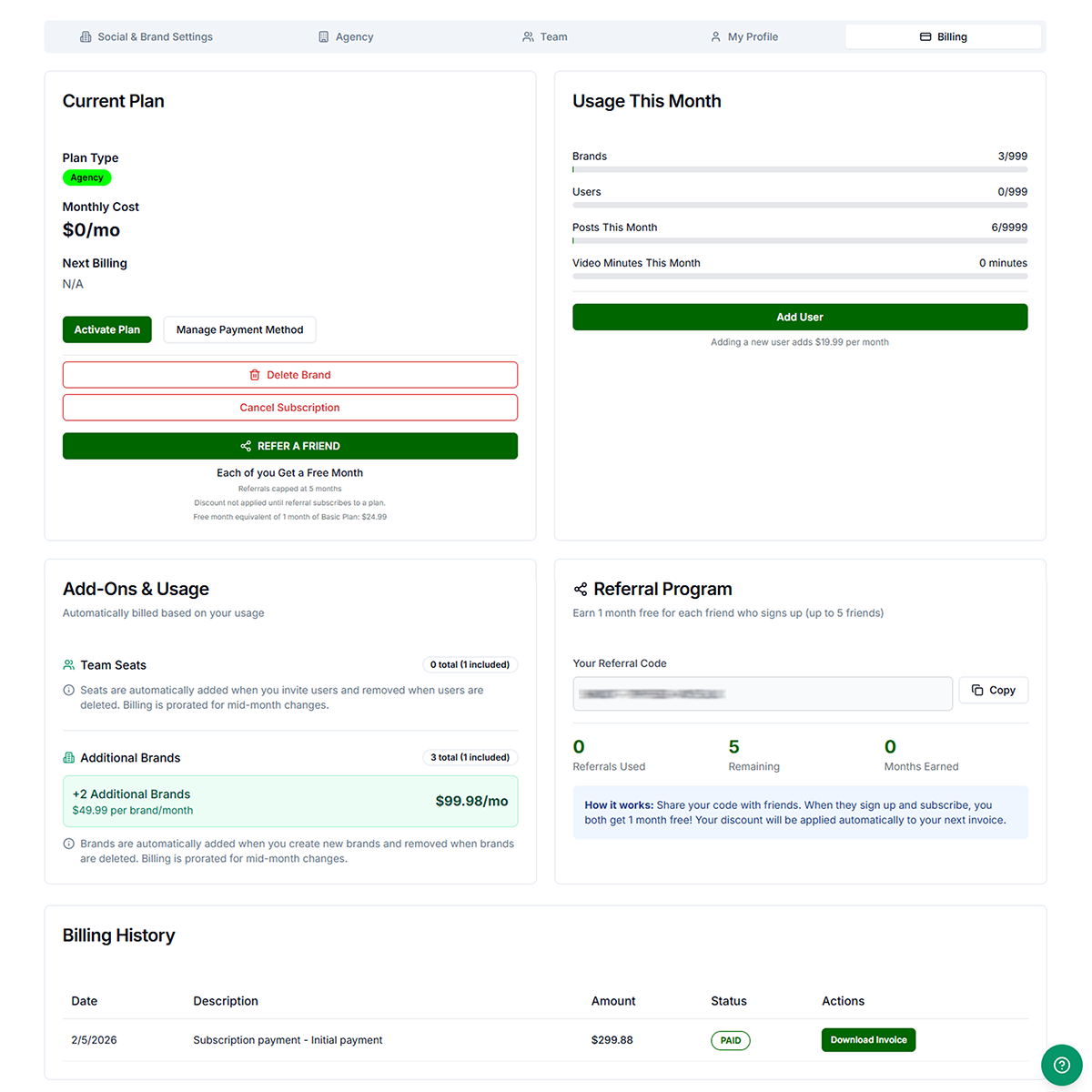
Current Plan
- View plan details — Plan type, monthly cost, and next billing date
- Activate Plan — If your plan is not yet active, click to complete setup and enter payment information
- Change Plan — Upgrade or downgrade. Once you choose your new plan, you will be guided through entering your billing information. Upgrades apply immediately (prorated). Downgrades take effect at the end of the billing cycle.
- Manage Payment Method — Update your card. Card details are not stored on Get Shouting servers.
- Note: Once you have chosen your new plan, you will be guided through entering your billing information. Yearly or annual plans are billed once a year and provide significant savings over monthly plans, which are billed every month.
- Delete Brand — Remove the brand from your account.
- Cancel Subscription — Cancel your subscription. Access continues until the end of the paid period. No refund for unused time.
A Refer A Friend callout may appear here. Referrals are capped at 5. The discount is not applied until the referral subscribes to an annual/yearly plan. The free month is equivalent to 1 month of the Basic Plan ($24.99).
Usage This Month
- View usage — Brands, users, posts, and video minutes used this month
- Add User — Add a new user (adds a seat charge per month; amount varies by plan)
Monitor your usage against plan limits. Update your payment method before your card expires to avoid service interruptions.
Add-Ons & Usage
Automatically billed based on your usage.
- Team Seats — Seats are automatically added when you invite users and removed when users are deleted. Billing is prorated for mid-month changes.
- Additional Brands — Brands are automatically added when you create new brands and removed when brands are deleted. Billing is prorated for mid-month changes.
Each add-on shows total used, included amount, and per-unit cost.
Referral Program
- View your referral code — Copy your unique code to share with friends
- Track referrals — See referrals used, remaining (up to 5), and months earned
Share your code with friends. When they sign up and subscribe, you both get 1 month free. Your discount is applied automatically to your next invoice.
Billing History
- View transactions — Date, description, amount, and status for each payment
- Download Invoice — Download a PDF receipt for any paid transaction
Troubleshooting
- Billing tab not visible: You are a User or Admin. Only Super Admins have access. Contact your brand's Super Admin.
- Payment failed: Update payment method with valid card. Verify billing address. Try a different card.
- Invoice not downloading: Allow pop-ups for getshouting.app. Try a different browser.